/
How to Add a Watermark to eBay Images
Important: This is a legacy version of the documentation. Please visit the current documentation page.
How to Add a Watermark to eBay Images
- Former user (Deleted)
- Kateryna Cherkes
- Former user (Deleted)
- m2e_employee (Unlicensed)
Owned by Former user (Deleted)
Last updated: Sept 10, 2021 by Kateryna Cherkes
If you want to identify your images and protect them from unauthorized use online, use the Watermark feature. It applies a custom watermark to all images sent to eBay. Learn how to set it up below.
The watermark option is only available for the images hosted on your Magento.
Navigate to eBay > Configuration > Policies > Description Policy > Images & Watermark:
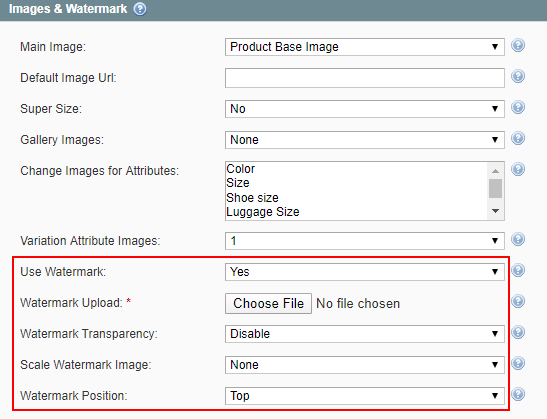
1. Set Use Watermark to Yes.
2. Click Browse in Watermark Upload and select a file with the watermark picture.
Watermark preview will be only available after saving settings.
3. Choose if you want to add transparency.
| Transparency = Disabled | Transparency = Enabled |
|---|---|
|
|


4. Choose if you want to scale the watermark.
| None | In Width | Full Image |
|---|---|---|
|
|
|



5. Choose where the watermark will be placed on the image.
| Top | Middle | Bottom |
|---|---|---|
|
|
|



The watermark will be displayed on all of your eBay gallery images.
, multiple selections available,
Related content
How to upload images
How to upload images
More like this
How to upload images
How to upload images
More like this
Grouped Product Images Upload
Grouped Product Images Upload
More like this
How to Set Up Custom Description
How to Set Up Custom Description
More like this
How to Set Up Custom Description
How to Set Up Custom Description
More like this
Set Item Specifics
Set Item Specifics
More like this